Scaling the Elastio x AWS GuardDuty integration: hub-and-spoke for multi-account AWS

Six months ago we introduced the Elastio x AWS GuardDuty integration: when GuardDuty’s Malware Protection for S3 or its EBS Volume Scan flags a malicious file, Elastio automatically validates the recovery posture of every backup of that asset. The original post focused on why. Malware detection alone doesn’t tell you whether your backups are recoverable, only whether a known signature is present.
The integration has since grown up. The v1 design assumed each customer ran one AWS account with GuardDuty enabled. In practice, every security team we talk to has anywhere from three to several hundred AWS accounts, organized under AWS Organizations, owned by different business units, scattered across regions. A per-account integration is a non-starter at that scale.
This post walks through the hub-and-spoke deployment model we ship today, and the one design subtlety that trips most operators up on first install.
Recap: what the integration does
GuardDuty Malware Protection scans objects you upload to S3 and EBS volumes attached to EC2 instances. When it finds something, malware, an EICAR test file, a flagged hash, it emits a high-confidence finding with the exact resource ARN. That finding is Elastio’s trigger: we map the impacted resource to every backup we hold for it, run ransomware-grade integrity validation across recovery points, and surface “last known clean recovery point” instead of just “scan returned clean”.
Two finding types are in scope today:
| GuardDuty feature | Finding type | Asset Elastio scans |
|---|---|---|
| S3 Malware Protection | Object:S3/MaliciousFile |
The S3 bucket |
| EBS Volume Scan | Execution:EC2/MaliciousFile |
The EC2 instance (all attached volumes) |
AWS emits each finding onto the default EventBridge bus in the account and region where it was detected. To get from there to Elastio we need to (a) forward findings from every account+region, (b) collapse them into a single trusted stream, and (c) deliver them across an account boundary. That’s the job of the hub-and-spoke topology.
Architecture in one picture
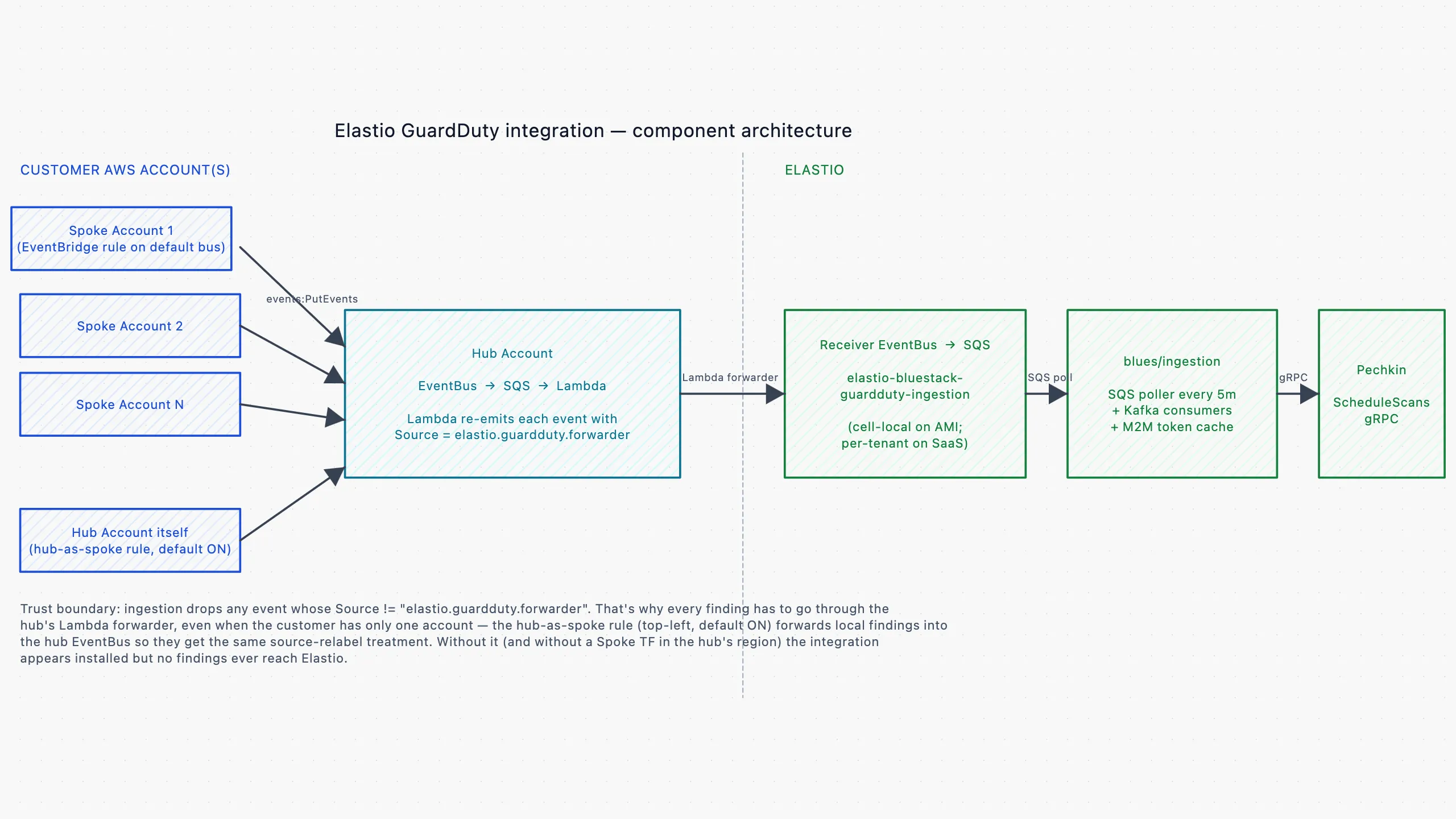
Three components, three trust boundaries:
- Spoke. A thin EventBridge rule on the default bus of every (account, region) pair that has GuardDuty enabled. It matches
source: aws.guarddutyand forwards each finding to a hub EventBus you nominate. - Hub. A single AWS account that hosts the aggregating EventBus, an SQS queue, and a small Lambda forwarder. The Lambda is where the trust boundary is enforced: it re-emits each finding with
Source = elastio.guardduty.forwarder, a label Elastio’s ingestion service explicitly whitelists. Anything that arrives without that label is dropped. - Receiver. The EventBus on Elastio’s side that consumes forwarded events and feeds them into the scan-scheduling pipeline.
The split is what makes the integration safe to operate at scale. Customer accounts never talk directly to Elastio; the only cross-account boundary they cross is the one to their own hub. The hub is also where you control fan-in. Adding a new spoke is a one-line change to the hub’s spoke_account_ids list.
Where to deploy what
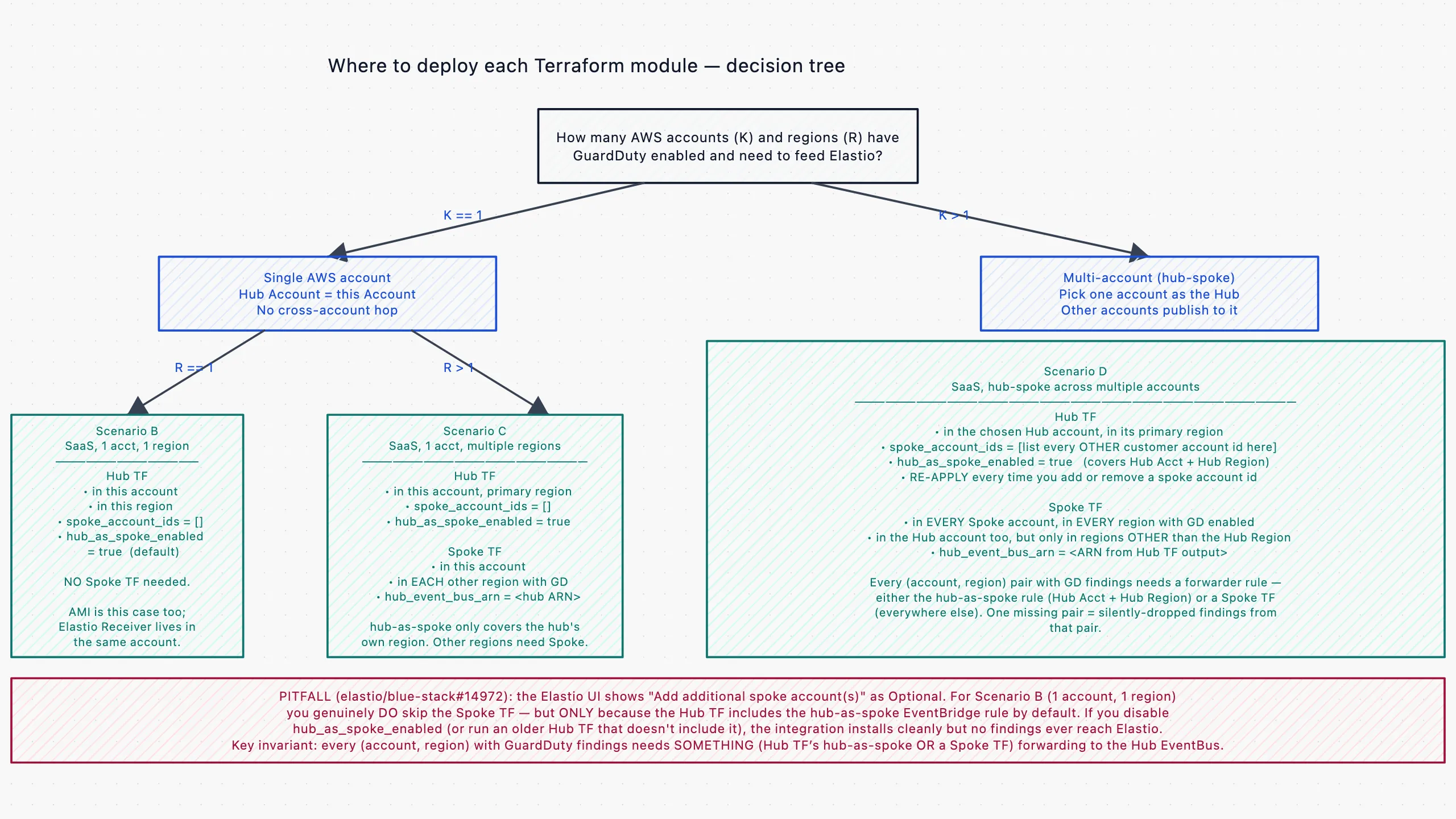
The deployment matrix depends on two numbers: how many AWS accounts have GuardDuty turned on, and how many regions across those accounts. The decision tree above maps those numbers to the right combination of Terraform modules.
- One account, one region. Run the Hub module. Don’t list any spokes.
hub_as_spoke_enabled = true(default) sets up the EventBridge rule on the account’s default bus itself. Oneterraform applyand you’re done. - One account, multiple regions. Run the Hub module in your primary region; run the Spoke module in every other region with GuardDuty enabled. GuardDuty is region-scoped, so each region needs its own forwarder rule.
- Multiple accounts. Pick one as the hub. Run the Hub module there with
spoke_account_ids = [<every other account’s id>]. In each spoke account, run the Spoke module pointing at the hub’s EventBus ARN. Don’t forget to also run the Spoke module in every additional region of the hub account.hub_as_spoke_enabledonly covers the hub’s primary region. - Standalone Elastio (self-hosted / GovCloud). Same wiring, but the Receiver EventBus lives in your AWS account instead of ours. The installer bootstraps the receiver-side queue and IAM role automatically.
The subtlety: every (account, region) needs a forwarder
We’ve watched several customers run terraform apply on the Hub module, see it succeed, and then puzzle over why their EICAR test file never produces an Elastio scan. The almost-universal cause: they assumed the Hub module was all they needed, and the UI’s “Add additional spoke account(s), Optional” step reinforced that assumption.
It is optional, for additional accounts. It is not optional for the hub account itself if hub_as_spoke_enabled is off, or if GuardDuty is enabled in any region other than where the Hub module is deployed.
hub_as_spoke_enabled = true now ships as the default to make the common case work out of the box.
What happens when a finding fires
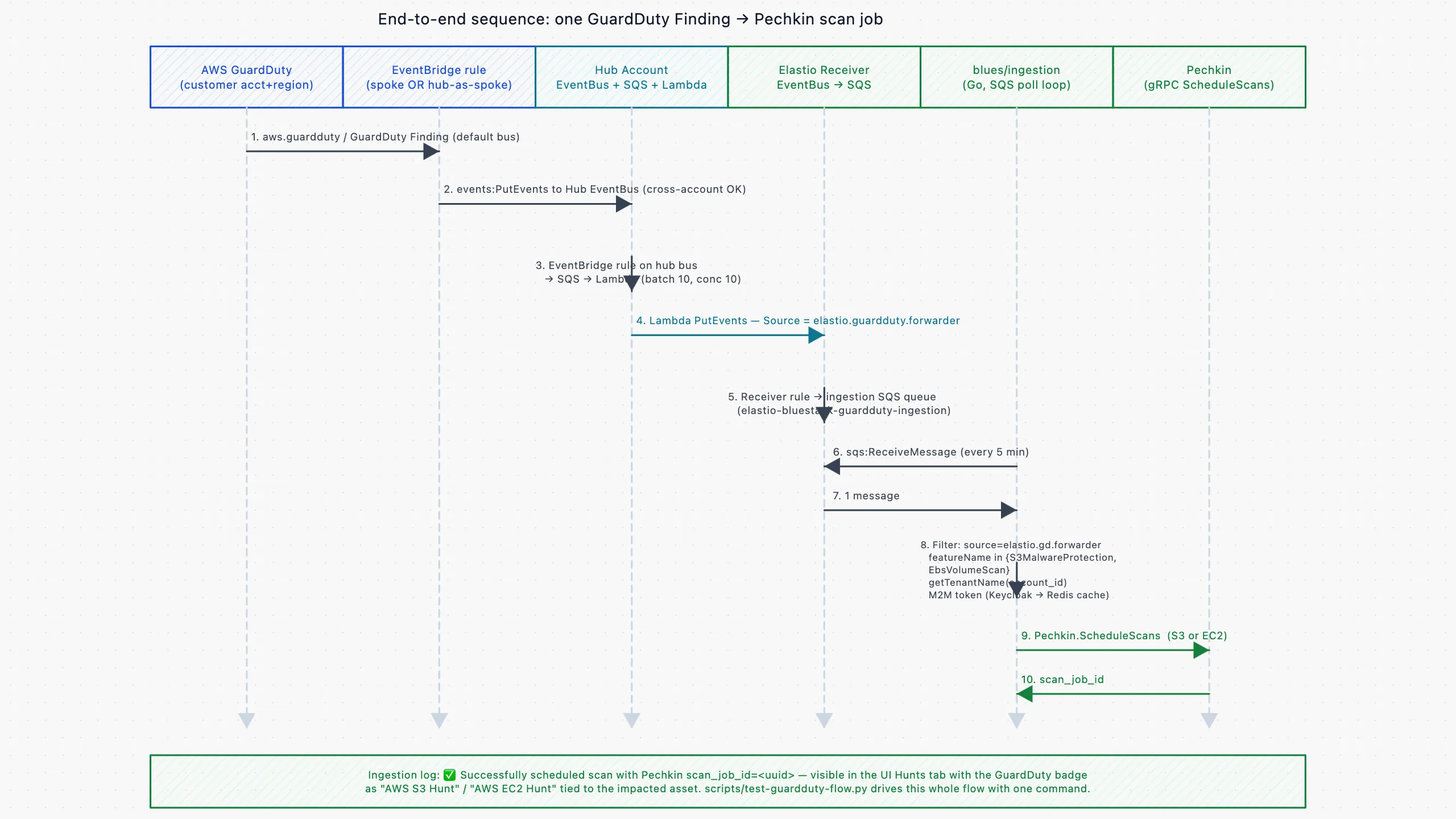
The sequence above is what happens between AWS detecting a malicious file and Elastio scheduling a scan against it:
- 1. Detection. AWS GuardDuty writes a finding (
Object:S3/MaliciousFileorExecution:EC2/MaliciousFile) onto the default EventBridge bus in the account+region where the detection happened. - 2. Spoke forward. The Spoke (or hub-as-spoke) rule matches the finding and uses
events:PutEventsto forward it cross-account into the Hub EventBus. - 3. Hub queue. The Hub EventBus routes it through an internal rule into an SQS queue, which triggers the Lambda forwarder (batch size 10, max concurrency 10).
- 4. Trusted-sender envelope. The Lambda calls
events:PutEventsagainst the Elastio Receiver EventBus, rewritingSourcetoelastio.guardduty.forwarder. Everything downstream treats the source as authoritative because the Lambda is the only thing that ever writes this label. - 5. Ingestion. On the Elastio side, the Receiver routes the event into an ingestion queue. The ingestion service polls every five minutes, drops anything that doesn’t carry the trusted source, resolves the AWS account to a tenant, and looks up the impacted asset.
- 6. Scan scheduled. If everything matches, Elastio’s scan scheduler queues a scan and returns a
scan_job_id. The scan executes asynchronously and appears in the UI’s Hunts tab tagged with the GuardDuty badge.
End-to-end latency on the happy path is a few seconds plus the 5-minute SQS poll cycle. Failures fall into a DLQ at the hub and never disappear silently.
Setup: single account
From the Integrations page in the Elastio UI, in CloudShell of your hub AWS account:
module "elastio_guardduty_hub" {
  source = "git::https://github.com/elastio/elastio-guardduty.git//infra/modules/internal-routing/hub"

  # Copy this ARN from the Elastio UI's GuardDuty integration page
  elastio_eventbus_arn = "arn:aws:events:<region>:<elastio-acct>:event-bus/<bus-name>"

  # Single account: no need to list spokes. hub-as-spoke is on by default
  spoke_account_ids    = []
  hub_as_spoke_enabled = true

  tags = {
    Environment = "production"
    ManagedBy   = "Terraform"
  }
}
terraform init && terraform applyUpload an EICAR test file to a bucket with Malware Protection enabled, wait 5 to 30 minutes for AWS to scan it, and a Hunt job tagged “AWS S3 Hunt, triggered by AWS GuardDuty” should appear in the Elastio UI.
Setup: multiple accounts
In the hub account, the same module with spoke_account_ids populated:
module "elastio_guardduty_hub" {
  source = "git::https://github.com/elastio/elastio-guardduty.git//infra/modules/internal-routing/hub"

  elastio_eventbus_arn = "arn:aws:events:..."

  spoke_account_ids = [
    "111111111111",
    "222222222222",
    "333333333333",
  ]
}
Each id listed there is added to the Hub EventBus’s resource policy as an allowed events:PutEvents principal. Re-apply the hub module every time you add or remove an account. The policy is rebuilt from the list.
Then, in each spoke account (and every region of the hub account other than the primary), run the Spoke module pointing at the hub’s event_bus_arn:
module "elastio_guardduty_spoke" {
  source = "git::https://github.com/elastio/elastio-guardduty.git//infra/modules/internal-routing/spoke"

  hub_event_bus_arn = "arn:aws:events:<hub-region>:<hub-acct>:event-bus/<hub-bus-name>"
}
For multi-region rollouts the same module gets deployed per region using a per-region provider alias. Terraform handles it cleanly.
What’s new vs v1
The original integration used a single EventBridge rule per customer account writing directly to a per-tenant EventBus. The current design adds several things that turned out to matter at scale:
- Buffering and retries. SQS plus a Lambda forwarder sit between the EventBridge rule and the Receiver. Bursts of findings (think: GuardDuty re-scanning hundreds of S3 objects after a policy change) no longer drop, and transient
PutEventsfailures retry automatically. Anything that fails after the retry budget lands in a DLQ. - Hub-as-spoke by default. Single-account customers don’t have to know the Hub-vs-Spoke distinction exists; one
terraform applywires up both roles. - Cross-region from one TF apply. The Lambda is region-aware. It forwards to a Receiver in any region.
- Pluggable spoke list. Adding an AWS account to your security perimeter is a one-line diff on the hub module plus one Spoke deployment in the new account. Removal is symmetric.
- DLQs everywhere. Every queue and EventBridge target has a configured DLQ with sane defaults. Wire it to your alerting for a “GuardDuty events not reaching Elastio” alarm.
- Built-in end-to-end testing. A shipped script synthesizes a GuardDuty finding shaped exactly like AWS would emit it, pushes it through the pipeline, and verifies the full ingestion to scan-schedule path within roughly 30 seconds, without waiting on a real GuardDuty scan (5 to 60 minutes). Useful for both day-1 validation and ongoing regression checks.
Try it
The hub-and-spoke integration is generally available today. If you’re already an Elastio customer, the Integrations → AWS GuardDuty page in the UI walks you through it. If you’re evaluating Elastio, reach out and we’ll set up an account.
For teams running Elastio in standalone mode (self-hosted / GovCloud), the same Hub and Spoke Terraform modules apply. Your Receiver EventBus just lives in your own AWS account, and the installer wires that side up automatically.